Vector
https://learn.microsoft.com/en-us/azure/cosmos-db/gen-ai/why-cosmos-ai
Notes: - Requires 15 minutes to be enabled at account level. - Only available in NoSQL CosmosDB. - The vector search feature is currently not supported on the existing containers, so you need to create a new container and specify the container-level vector embedding policy and the vector indexing policy at the time of container creation.
az cosmosdb update \
 --resource-group <resource-group-name> \
 --name <cosmos-db-account-name> \
 --capabilities EnableNoSQLVectorSearch
Vector Policy
Once the Vector Search feature is enabled on your Azure Cosmos DB for NoSQL account, you must define a vector embedding policy for the containers where you want to store vectors. This policy informs the Azure Cosmos DB query engine how to handle vector properties in the VectorDistance system function. The following information is included in the container vector policy:
- path: The path of the property containing the vector embeddings.
- datatype: The type of the elements in the vector. The default is Float32.
- dimensions: This property is the number of dimensions in or length of each vector and will be driven by the model used to create embeddings.
- distanceFunction: The technique used to compute distance or similarity between vectors. The available options are Euclidean (default), cosine, and dot product.
"vectorEmbeddingPolicy": {
    "vectorEmbeddings": [
        {
            "path": "/vectorField",
            "dataType": "float32",
            "distanceFunction": "cosine",
            "dimensions": 1536
        }
    ]
}
Indexing Policy
{
    "indexingMode": "consistent",
    "automatic": true,
    ...
    "vectorIndexes": [
        {
            "path": "/embedding",
            "type": "diskANN",
            "quantizationByteSize": 96,
            "indexingSearchListSize": 100
        }
    ]
}
Supports vector search.
Focus on the DiskANN index:
Vector search in Azure Cosmos DB is built on DiskANN, a graph-based indexing and search system that can index, store, and search large sets of vector data on relatively small amounts of computational resources. DiskANN stores highly compressed, vectors in memory, while storing the full vectors and graph structure in on-cluster, high-speed SSDs that constitute the backbone of Azure Cosmos DB data storage. DiskANN provides fast search, while maintaining accuracy under replaces and deletions. DiskANN also supports efficient query filtering via pushdown to the index to enable fast and cost-effective hybrid queries. DiskANN has been used successfully within Microsoft for years, and today it is part of crucial Microsoft applications such as web search, advertisements, and the Microsoft 365 and Windows copilot runtimes.
Vector Types
| Type | Description | Max dimensions |
|---|---|---|
| flat | Stores vectors on the same index as other indexed properties. | 505 |
| quantizedFlat | Quantizes (compresses) vectors before storing on the index. This policy can improve latency and throughput at the cost of a small amount of accuracy. | 4096 |
| diskANN | Creates an index based on DiskANN for fast and efficient approximate search. | 4096 |
| Feature | Flat | QuantizedFlat | DiskANN |
|---|---|---|---|
| Search Type | Exact (Brute-force) | Exact (on compressed data) | Approximate (Graph-based) |
| Accuracy (Recall) | 100% (Perfect) | ~99% (High) | ~95% - 99% (Tunable) |
| Speed | Slow (Linear) | Fast | Fastest (Logarithmic) |
| RAM Usage | Very High | Low | Lowest (Offloads to SSD) |
| Best For... | < 10k vectors | 10k – 50k vectors | 50k – Billions of vectors |
Vector Search
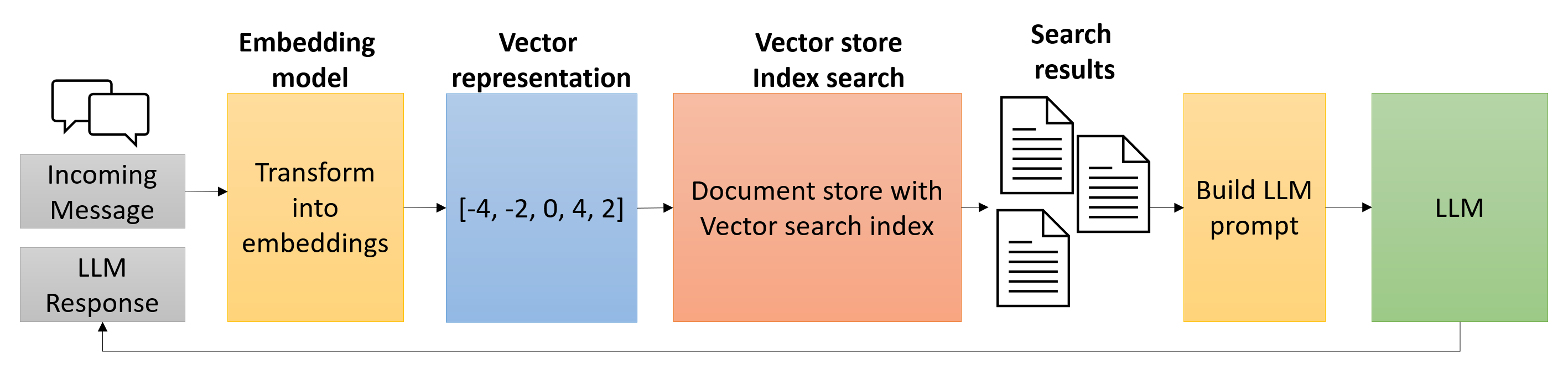
Executing vector searches with Azure Cosmos DB for NoSQL involves the following steps:
- Create and store vector embeddings for the fields on which you want to perform similarity searches.
- Specify the vector embedding paths in the container's vector embedding policy.
- Include any desired vector indexes in the indexing policy for the container.
- Populate the container with documents containing vector embeddings.
- Generate embeddings representing the search query using Azure OpenAI or another service.
- Run a query using the VectorDistance function to compare the similarity of the search query embeddings to those embeddings of the vectors stored in the Cosmos DB container.
Vector Embedding
- Requires to enable Vector Indexing in Indexing Policy.
- Distance function
- Cosine similarity measures the angle between two vectors, making it ideal for comparing text embeddings where magnitude shouldn't affect similarity. Azure OpenAI embeddings are normalized, meaning cosine similarity works well for them. The VectorDistance function returns cosine similarity scores ranging from -1 (least similar) to +1 (most similar), with most practical results falling between 0 and 1. Higher scores indicate greater similarity between the query and document vectors.
- Dot product measures both angle and magnitude. For normalized vectors like those from Azure OpenAI, dot product results are mathematically identical to cosine similarity but can be slightly faster to compute. Use dot product when your embeddings are guaranteed to be normalized and you want maximum query performance.
- Euclidean distance measures the straight-line distance between two points in the vector space. Scores range from 0 (identical) to positive infinity (most different). This function suits specialized use cases where both direction and magnitude matter, but it's less common for text embeddings.
- Datatypes
- The float32 type provides full precision but consumes the most storage. Using float16 reduces storage by 50 percent with minimal impact on search quality—for most AI applications, this precision reduction is imperceptible in search results.
- Float32: provides the best balance of accuracy and simplicity.
- Multi vector for different fields. E.g. "path": "/titleEmbedding" another for "path": "/contentEmbedding".
vector_embedding_policy = {
    "vectorEmbeddings": [
        {
            "path": "/embedding",
            "dataType": "float32",
            "distanceFunction": "cosine",
            "dimensions": 1536
        }
    ]
}
Perform vector search using the VectorDistance function
Azure Cosmos DB for NoSQL supports the creation of vector search indexes on top of stored embeddings.
The VectorDistance function in Azure Cosmos DB for NoSQL measures the similarity between two vectors by calculating their distance using metrics like cosine similarity, dot product, or Euclidean distance. This function is vital for applications that require quick and accurate similarity searches, such as those involving natural language processing or recommendation systems. By utilizing VectorDistance, you can efficiently handle high-dimensional vector queries, significantly improving the relevance and performance of your AI-driven applications.
Notes
- MUST always create new container after feature is enabled.
- The vector search feature is currently not supported on the existing containers, so you need to create a new container and specify the container-level vector embedding policy and the vector indexing policy at the time of container creation.